Mixing the Streams – Adding YouTube Music Integration to Rekordbox
I identified a workflow problem for DJs and explored how this feature could reduce friction in their existing process. I explored adding a YouTube Music playlist streaming feature to Rekordbox, a platform relied upon by DJs for mixing and live performances.DJs use multiple tools to discover, organize, and perform music. When their music library and DJ software are disconnected, it creates extra steps and makes preparation more difficult.
Rekordbox already supports several major streaming services such as Apple Music, SoundCloud, and Beatport, but not YouTube Music — my personal streaming service of choice. Recognizing an opportunity to close this gap, I set out to design how YouTube Music integration could enhance both the user convenience and workflow efficiency of DJs who rely on dynamic, streaming-based music access.
My hypothesis was simple: many DJs, not just myself, would value quick and seamless access to YouTube Music playlists directly from Rekordbox without the need for manual syncing or conversions.
Setting the Stage.
Before diving into design, I developed a research plan and project roadmap to ensure structured progress.
To gather real-world insights, I reached out to 9 active DJs and everyday music listeners. I created and distributed an online survey that collected data on:
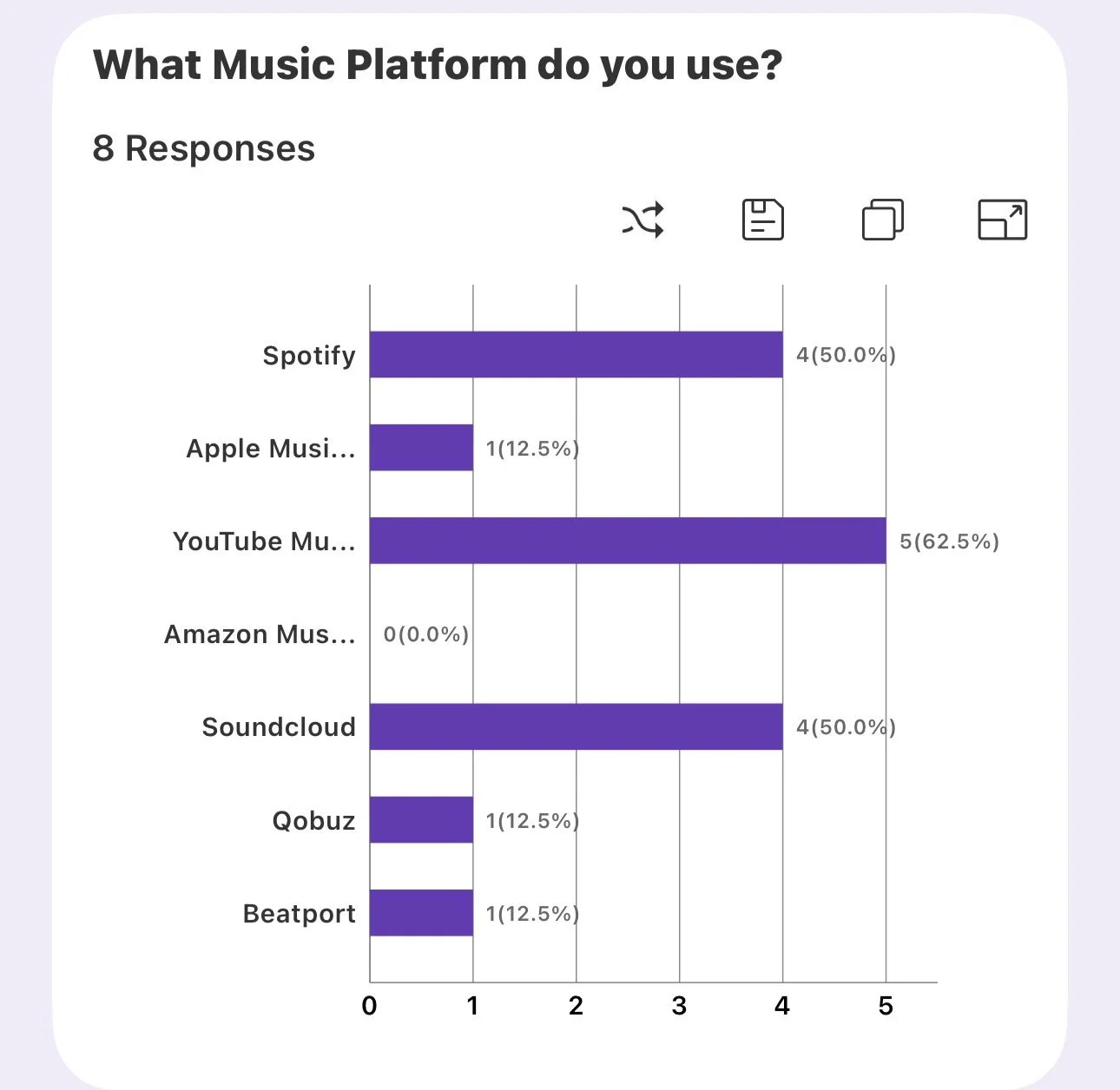
Streaming platform preferences
Pain points in accessing playlists during sets
Balance between purchased and streamed music in professional workflows
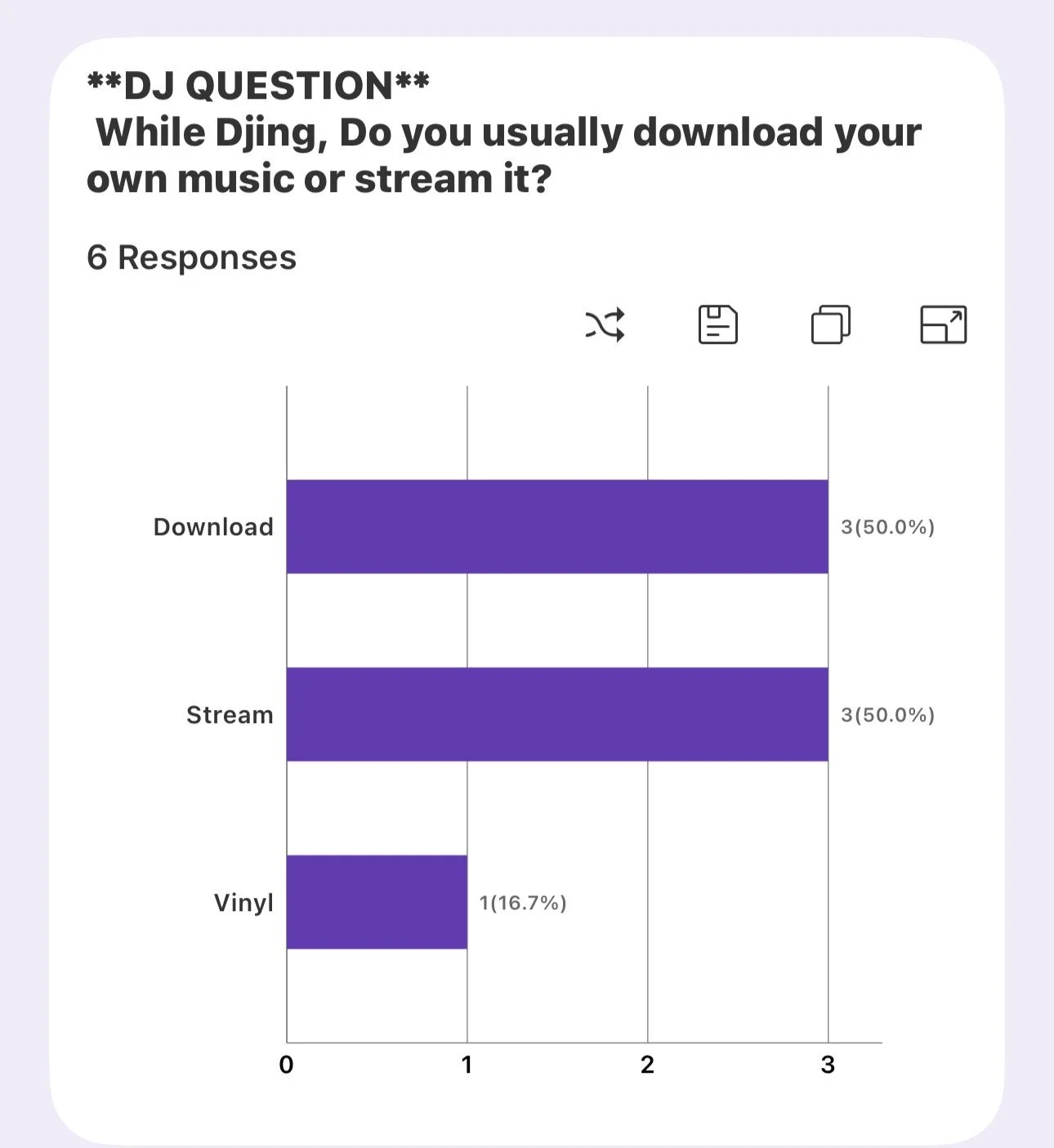
This initial survey created some data to correlate with my hypothesis and I was able to interview 5 Djs to get a feel for how they went through their process. VIEW SURVEY RESULTS
Findings
During my Interviews I noticed that most Djs really did have a preference for Higher Sound Quality but I was surprised that not every DJ felt that way.
I noticed that most Djs really did have a preference for Spotify and relayed on their Auto Mix option when casually mixing but none of them use the actually streaming part of Spotify since it is a newer edition to Rekordbox and has created some bugs that keep you from transferring your music to a USB so most of my participants refuse to use it. I found this insight very interesting since I was not a avid Spotify user.
The price point of paying a monthly subscription cost for access to your music seemed standard for most but a few participants felt it would cost more overtime and wanted to limit their subscriptions and pay for each song individually.
One participant in particular truly felt very passionately about owning all her music in hard copies because a previous song she had in her library ended up being socially “Cancelled” and was removed before she had a chance to download it properly.
Key insight: Time is a DJ’s most valuable resource — and integrating YouTube Music could drastically reduce pre-performance prep time.
Research in Motion – Listening to the Crowd
With my planning in place, I conducted competitive analysis and targeted user interviews.
Competitive Analysis: Examined how platforms like Apple music, Soundcloud and Beatport use Rekordbox to integrate with streaming services. This helped me pinpoint what Youtube Music was missing and identify potential inspiration for seamless streaming integration. View SWOT FILE
Apple Music
Apple Music's main customers are primarily 25-44 year-olds, with 45% of users falling into this age group. Additionally, 56% of Apple Music users are female, indicating a strong female demographic among its subscribers. The service has a significant presence in the U.S., contributing to 30.7% of the music-streaming subscriber market share in the country.
Soundcloud
SoundCloud is a music streaming and distribution platform founded in 2007, allowing users to upload, stream, and share music. It is known for its community-driven features, such as comments and playlists, which enhance the listening experience.
Beatport
Beatport is the world’s largest electronic music platform for DJs and artists, launched in 2004. It serves as a hub for DJs to access high-quality music files, stream tracks, and remix content. Beatport offers features like Beatport LINK streaming, a mobile app, and a vast catalog of electronic music, making it an essential tool for DJs and music enthusiasts worldwide. The platform also supports artists by providing distribution services and a community for sharing and discovering electronic music.
Next I worked on my interview questions and I used my survey as a way to find participants for the interviews.
User Interviews: Conducted 5 semi-structured interviews, with a mix of casual and professional DJs. They offered practical insights on how they build, manage, and perform using playlists. I made sure to have a variety of professional DJs ranging from Wedding DJs to Festival Performers, even those who only do it as a hobby and even one VINYL DJ to get the most well rounded interviews I could about the process.
VIEW INTERVIEW QUESTIONS
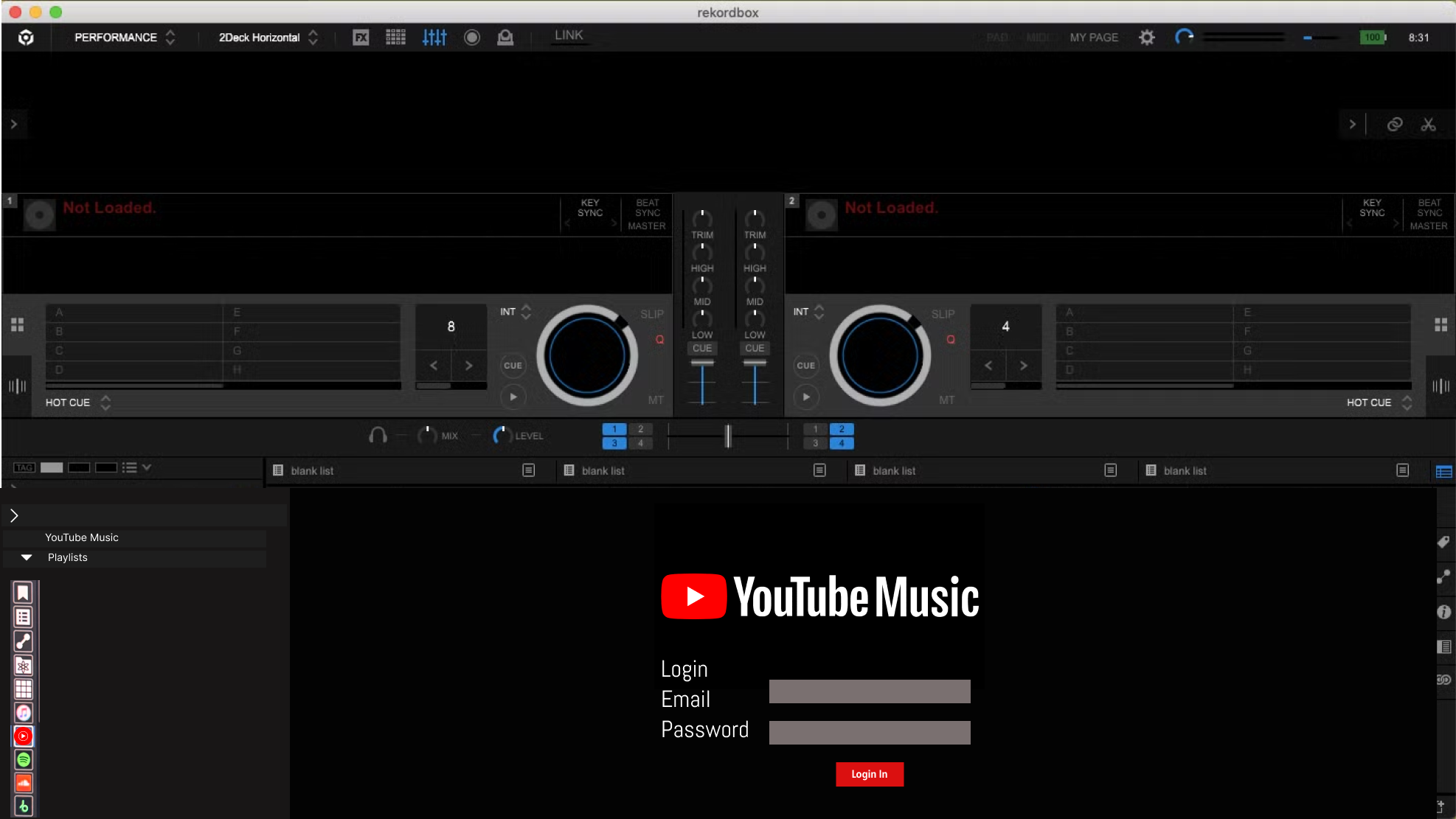
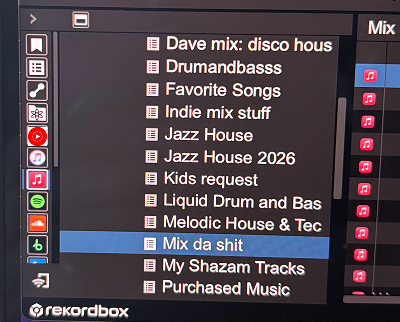
I added the Youtube Music Icon on the left side like Spotify and Apple Music
Persona
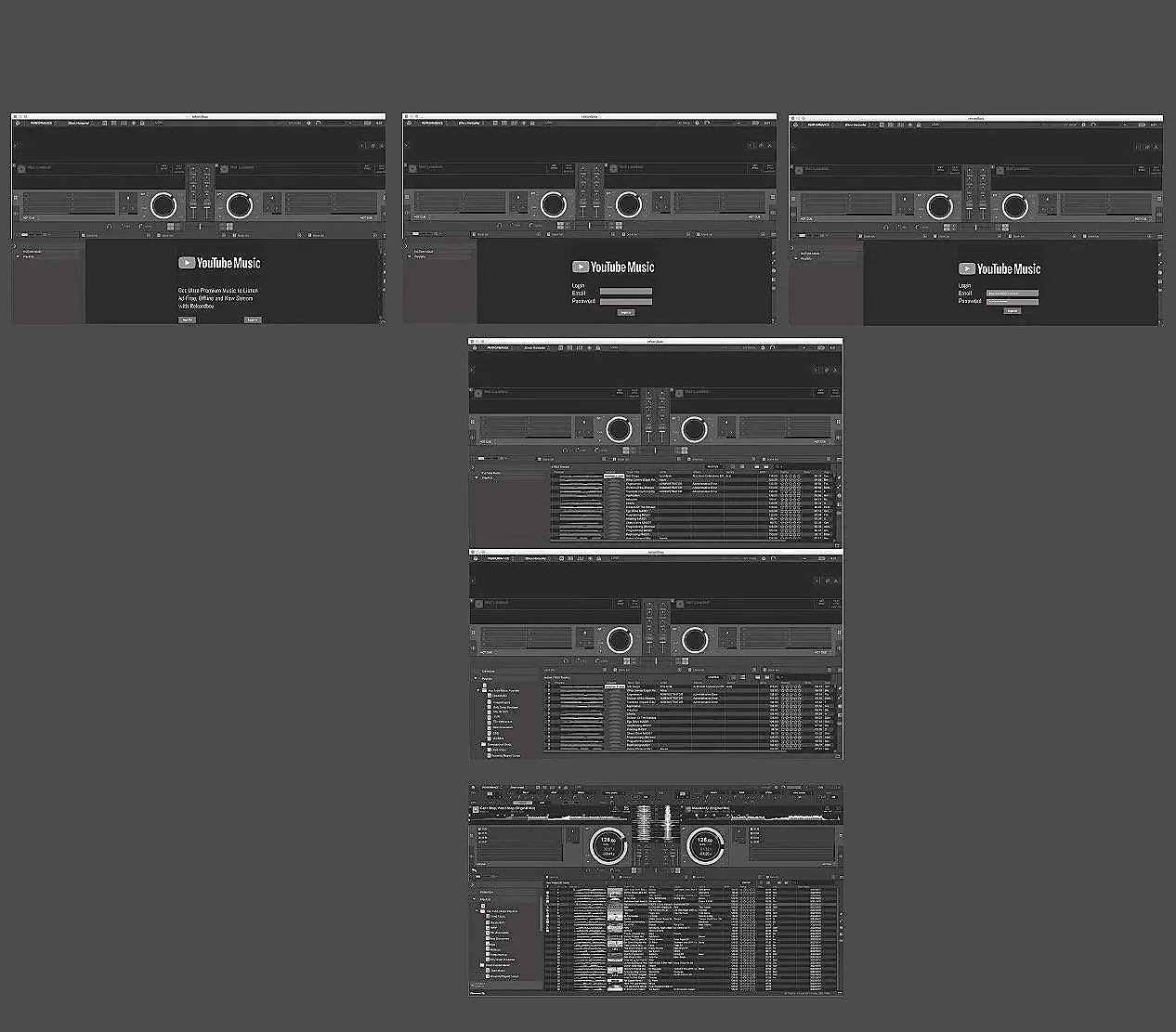
LO FI SKETCHES
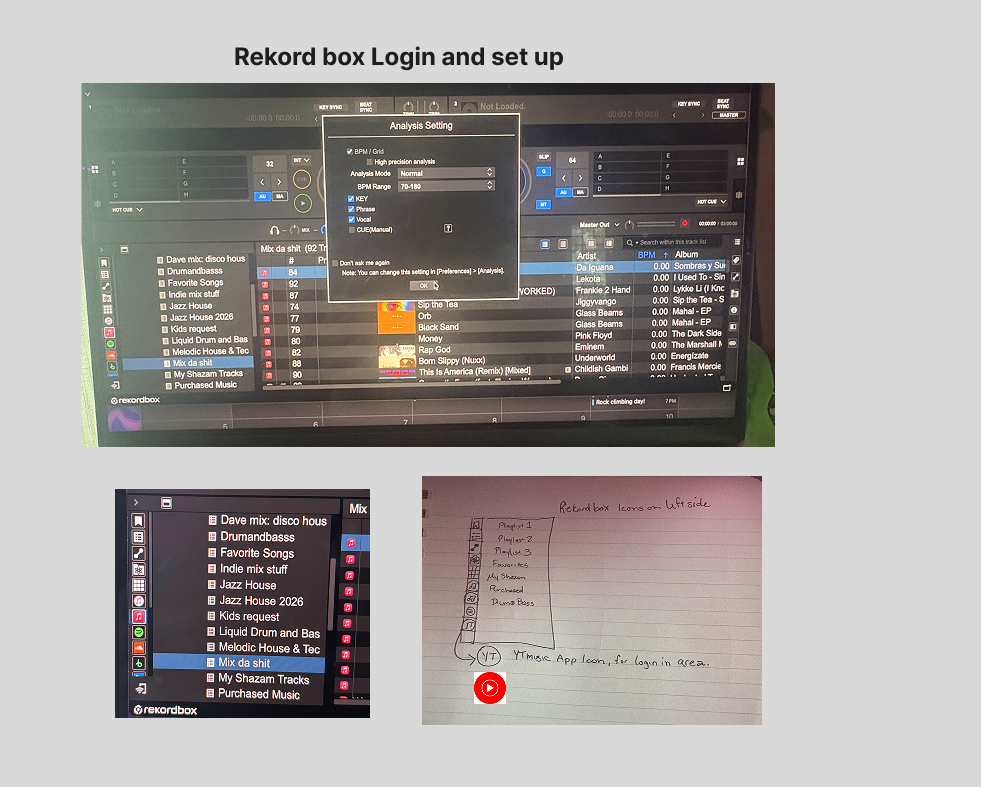
MID FI
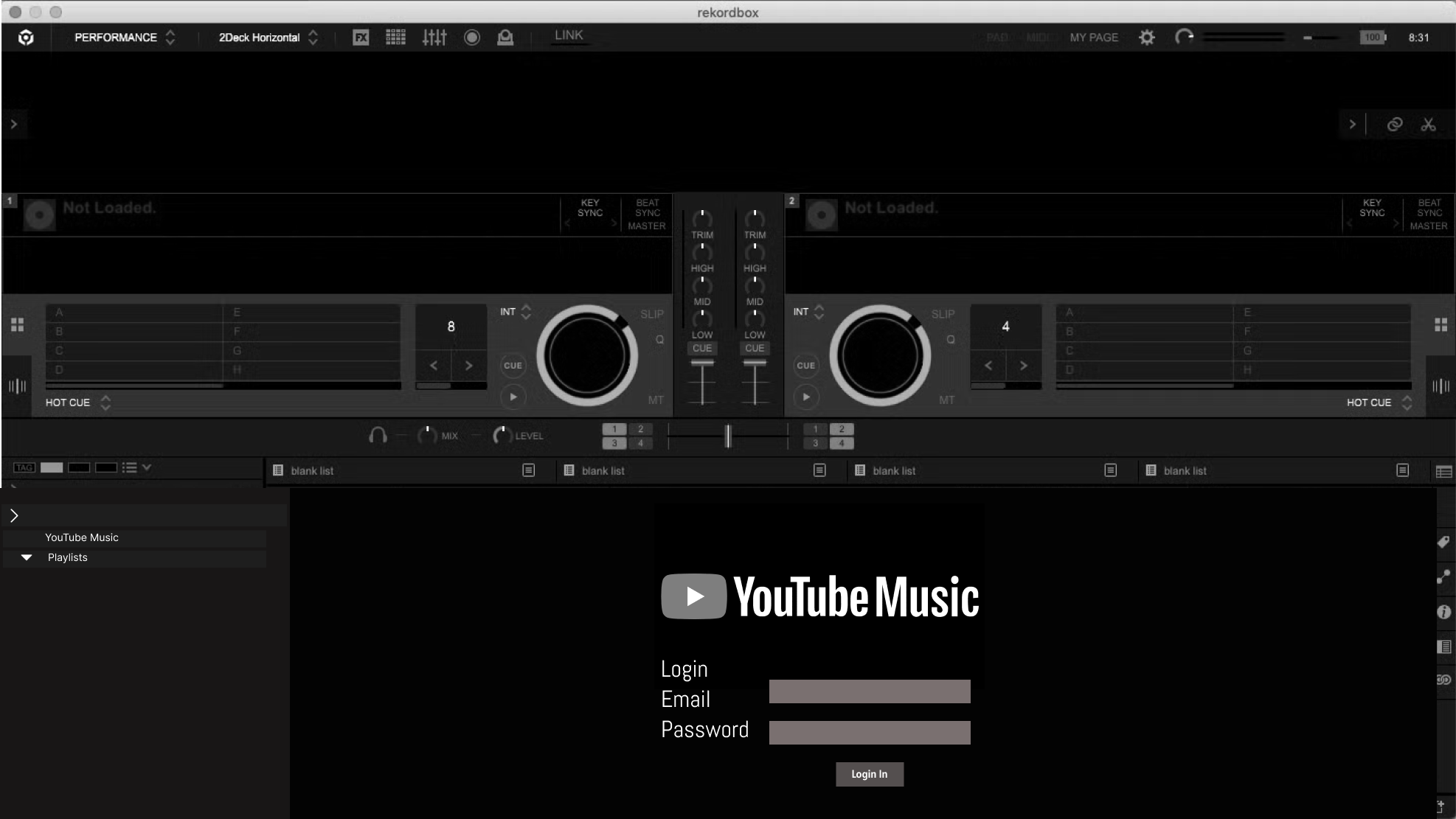
I made grayscale versions of how the login page would look in Rekordbox
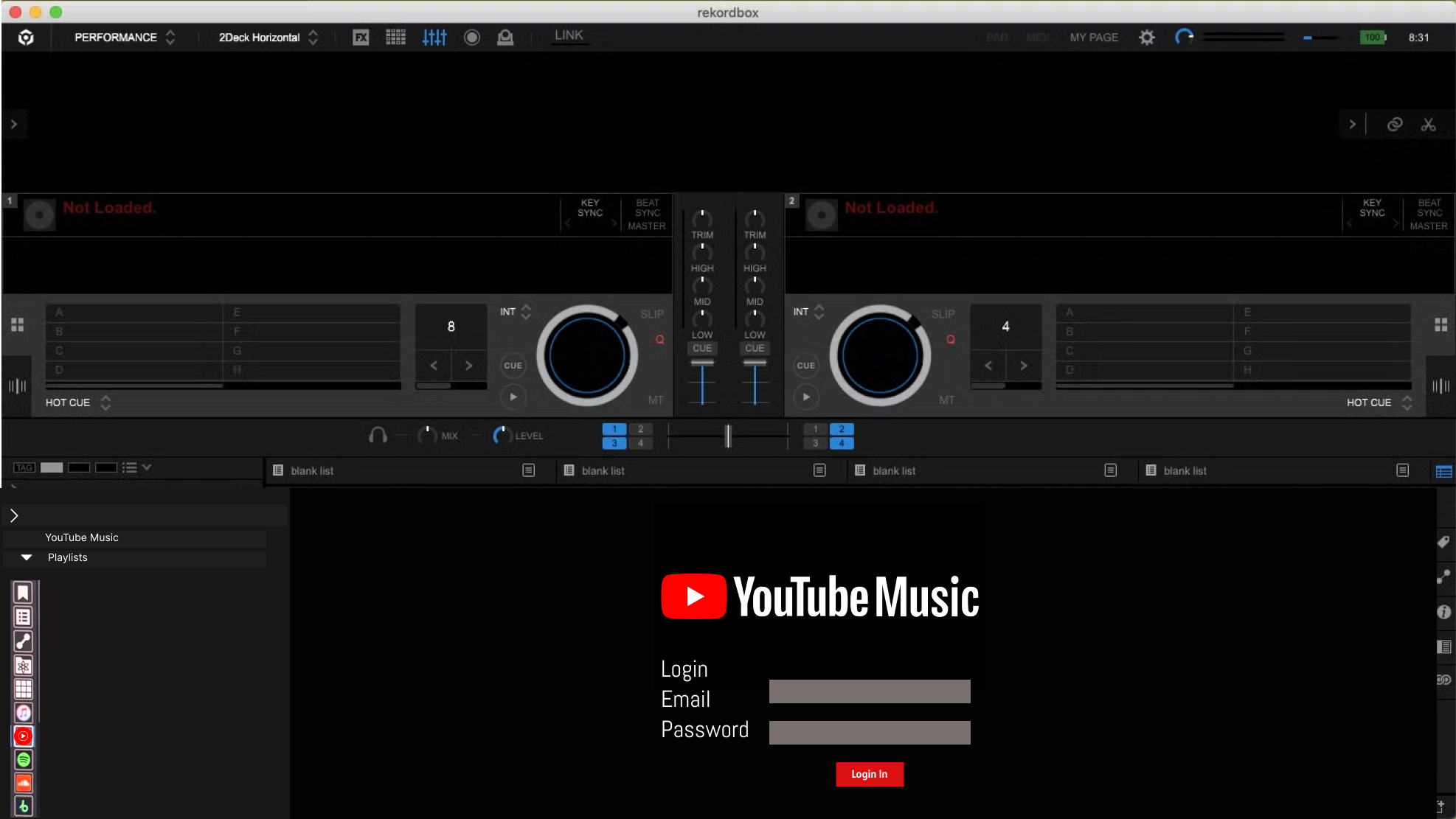
HIGH FI LOGIN SCREEN
User Flow
Finessing the Interface – Bringing the UI to Life
After successful iterations, I produced the high-fidelity prototype, featuring:
Full YouTube Music branding integration.
A clean, modular interface that blended naturally with Rekordbox’s existing aesthetic.
Thoughtful UI interactions for feedback during syncing and authentication.
Additional prototype testing confirmed the final design was intuitive, visually cohesive, and ready for real-world implementation.
The Final Mix – Reflections and Outcomes
Through this project, I learned the power of pairing personal motivation with user-centered design. By addressing my own pain point as a YouTube Music user, I uncovered a shared need across a wider community.
Integrating YouTube Music into Rekordbox wasn’t just about adding another feature — it was about enhancing creative freedom for DJs, streamlining setup time, and expanding accessibility for new users who prefer YouTube Music’s massive library.
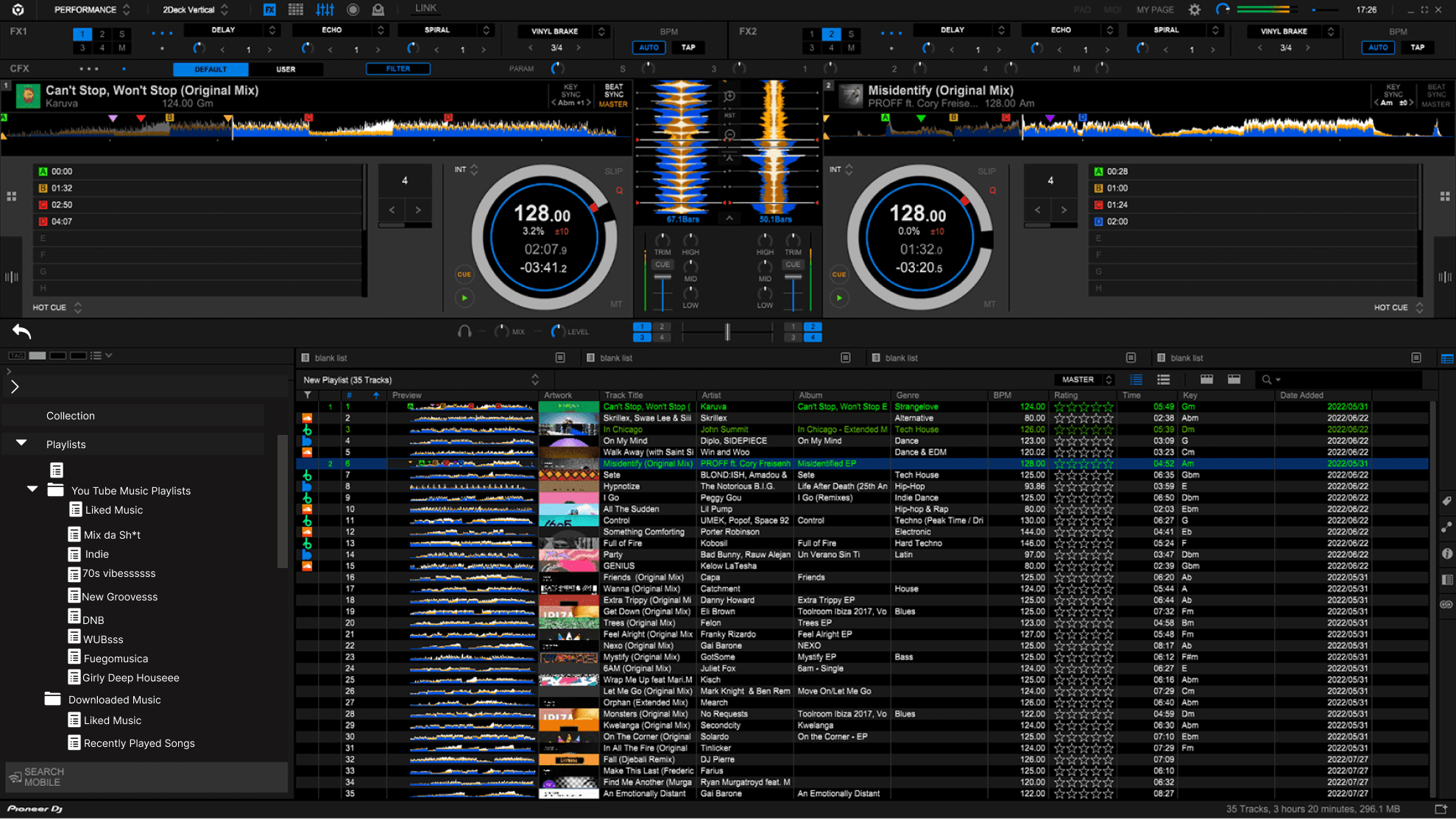
Once you are logged into Youtube Music on Rekordbox,
You can access your Youtube Music Playlist you have created in the APP
HIGH FI SCREEN IN Rekordbox
Youtube Music Playlist appear on left hand side
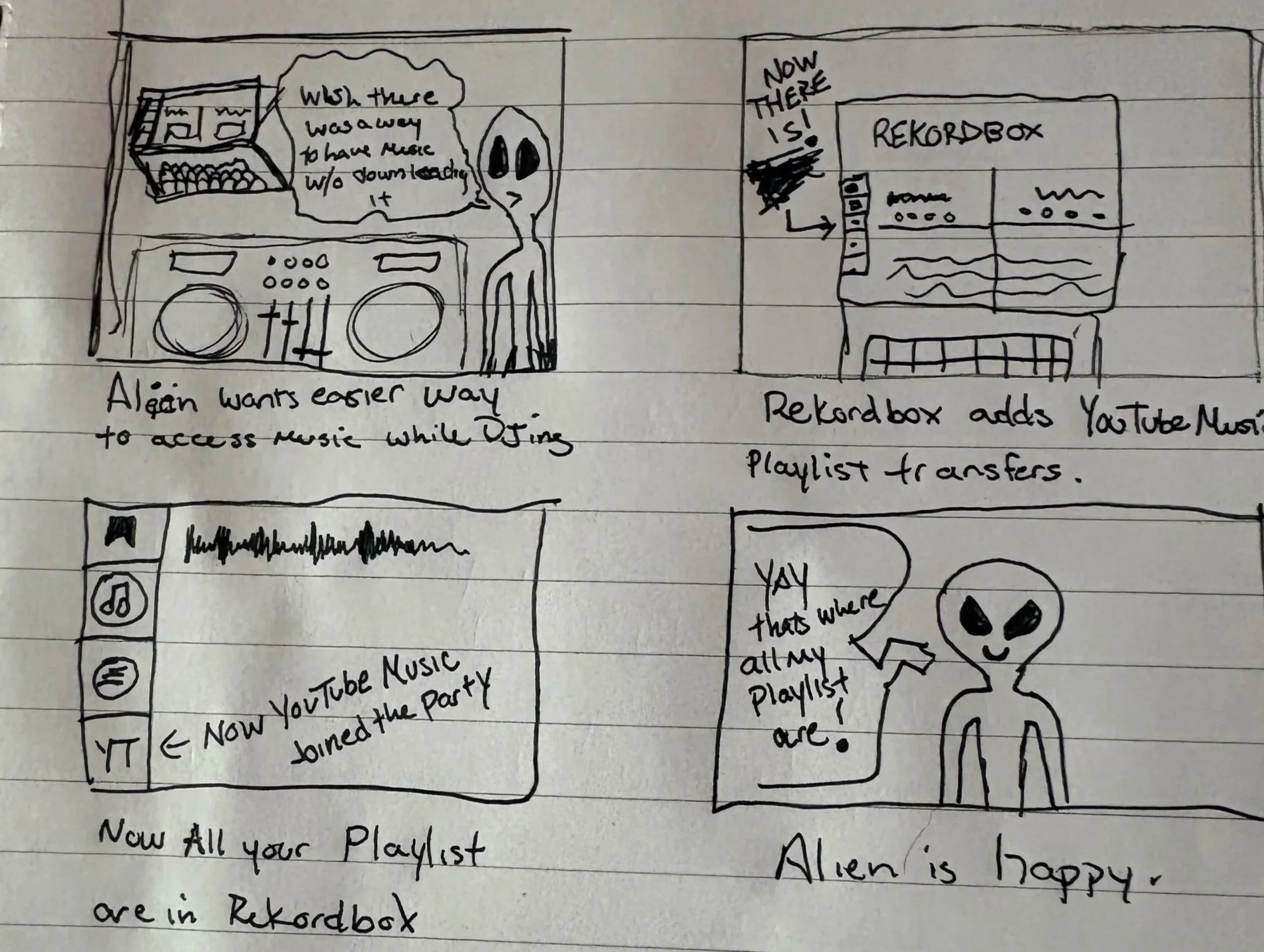
Storyboard
Making Sense of the Music – Synthesizing Research
After my Interviews I turned my insights into action, I synthesized my findings visually and strategically:
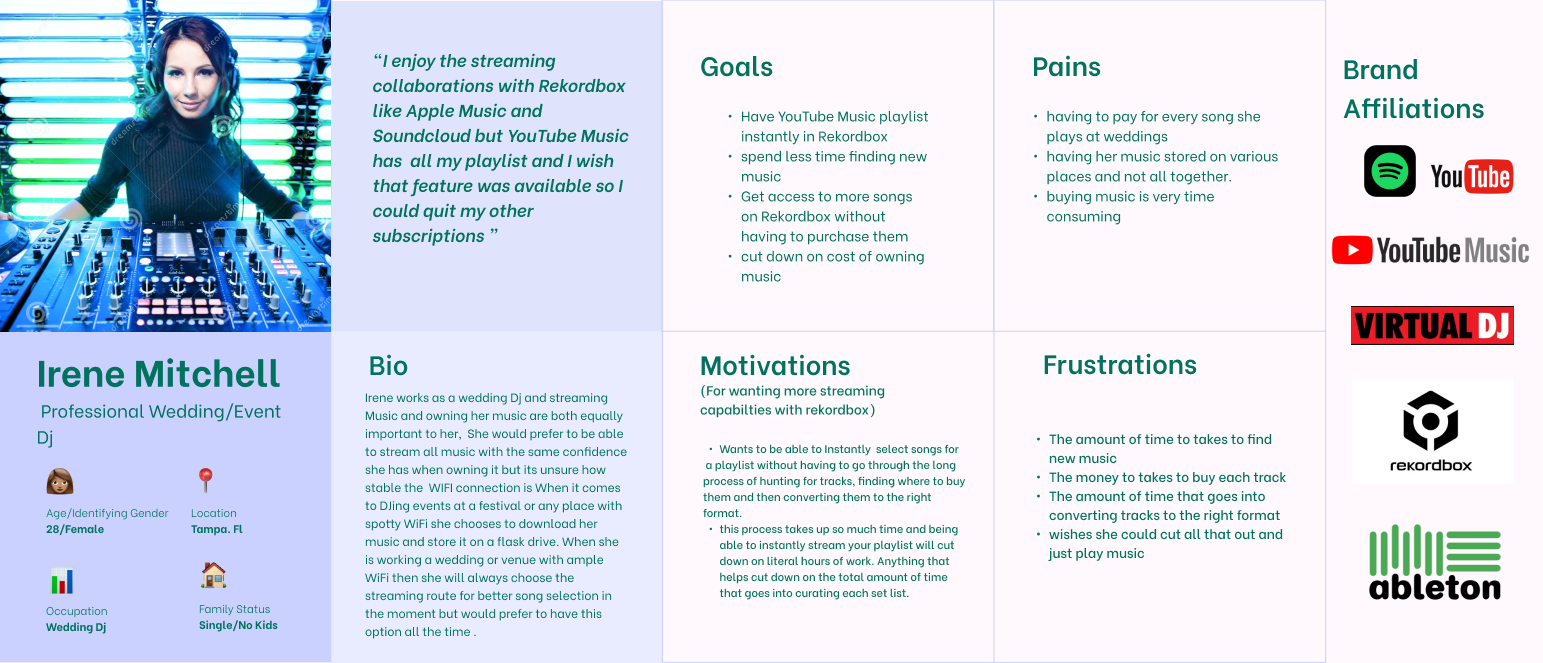
Affinity Mapping: From the information from my interviews and surveys I grouped pain points, goals, and desired outcomes from interviews to identify recurring themes such as efficiency, familiarity, and library synchronization. Then I used this information to create my persona
Persona Creation: Crafted a user persona — “The Versatile DJ” — representing users who juggle streaming and owned content and crave simplicity in their creative process.
Storyboard: Using the information from my Persona I Illustrated the step-by-step experience of finally seeing the option of logging into YouTube Music from within Rekordbox, capturing both the technical and emotional journey.
These activities clarified that users not only wanted YouTube Music integration — they expected it to feel native and effortless.
Defining the Beat – Prioritizing Goals
Next, I refined the project scope and structured the features. After realizing most of my participants had a preference for using Youtube Music I knew there would be a need for this in the industry.
Based off the Information my Findings were
Thought Process:
"DJs spend a lot of time preparing playlists before performances."
Insight:
"Managing music across multiple platforms creates unnecessary friction."
Design decision:
"Allow DJs to access and organize YouTube Music playlists directly inside Rekordbox."
Conclusion:
“DJs need an efficient way to access and sync their YouTube Music playlists within Rekordbox so they can spend less time managing tracks and more time mixing.”
Feature Prioritization: Determined a hierarchy of core needs:
Seamless login and authentication with YouTube Music.
Playlist synchronization and library refresh.
Smooth playback and search integration.
Offline cache or fallback options.
This framework ensured I tackled the most impactful functionality first.
Structuring the Flow – Mapping Information
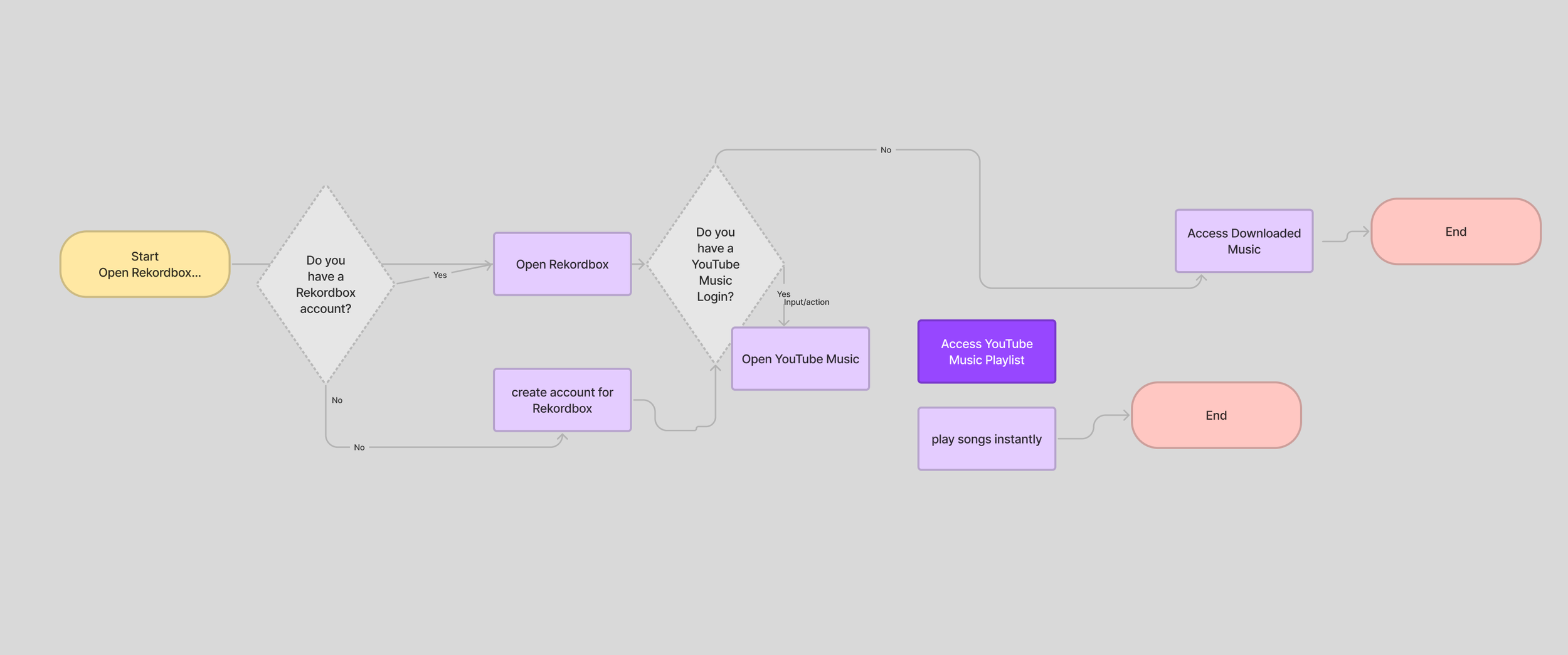
With goals locked in, I designed the user flow that would guide users through connecting their YouTube Music account to Rekordbox.
The flow included:
Navigating to the streaming services page within Rekordbox.
Selecting the widget “YouTube Music.” on the left hand panel
Authenticating through Google’s secure login.
Accessing and viewing imported playlists directly in Rekordbox.
This map became the foundation for future wireframes and a blueprint for user testing.
Designing in Layers – Prototyping and Testing
To not disrupt the current user flow I starting with low-fidelity wireframes, and used screenshots of the previously existing platform and began to explore different ways users might interact with login screens and playlist displays.
Next, I developed mid-fidelity prototypes in Figma to replicate the user flow.
My 5 Participants were asked to complete specific tasks, such as
logging in and loading playlists, while I observed points of confusion or friction.
Early tests revealed opportunities to:
Simplify iconography in the streaming hub.
Improved minor bugs that created issues in the intended flow
Created a back button and made the Icon always go back to the original login screen from any page
Created the Youtube Music Widget icon to go back to the login/ sign up screen
These refinements smoothed the user experience, setting the stage for more polished visuals.
Below are the results from my User Testing
Number of participants: 5
Goals:
Test users ability to easily navigate through the sign up or login process.
Test users ability to navigate through the playlist area after logging in.
Find any hang ups in the user flow that needs fixing
Make sure buttons all go to the right place.
First User
The First user was able to navigate through the process until the last login screen. It was not clickable and did not navigate successfully into the playlist area.
Second User
The Second user was able to navigate all the way through the process but the login button added the text in the text field area so I needed to redo the prototype flow so the text is added once you click into the rectangle text field.
Third User
The Third user had an issue using the prototype on a phone. I will need to make a responsive design.
Fourth User
The Fourth user noticed there was not a way to back out to the main page again and you can not easily scroll down to the login button on the filled out sign up page.
Fifth User
The Fifth user did not have any problems navigating through the flow because I had corrected most of the minor issues that were occurring immediately.